Posts: 1,678
Threads: 58
Joined: Mar 2012
12-09-2014, 05:31 AM
(This post was last modified: 12-27-2014, 08:29 AM by ~Axis~.)
I've tried spriting before, and I used to suck. I stopped spriting since then and I suck even worse so I'll just put it here and you guys can help me be a pro at this. I want to improve my spriting skills because I love sprite art and want to be able to be skillful enough to make any sprite and pixel art I desire. Here's a custom.
![[Image: yjtIwT1.png]](http://imgur.com/yjtIwT1.png)
I used the TFR pallete for this because I have a bad taste in colors if its all right.

Posts: 2,914
Threads: 96
Joined: Dec 2009
How about having a look at this? It should give you a few ideas on how to apply shading and highlights based on a light source.
![[Image: Apple-2.png]](http://i129.photobucket.com/albums/p203/blackdragon_photo_bucket/Apple-2.png)
Posts: 1,678
Threads: 58
Joined: Mar 2012
Thanks. I didnt know what I was thinking with the shading. I updated it now.

Posts: 969
Threads: 35
Joined: Mar 2010
You can barely see the darkest shade on the bottom. Either make it thicker or remove it.
Posts: 1,678
Threads: 58
Joined: Mar 2012
![[Image: HS8BFq5.png]](http://imgur.com/HS8BFq5.png)
Thickened the darkest shade.
Posts: 524
Threads: 9
Joined: Jul 2012
12-10-2014, 06:17 PM
(This post was last modified: 12-10-2014, 06:17 PM by TheShyGuy.
Edit Reason: images taken out of spoiler since its not working...
)
The shading doesn't follow the surface of the ball. With directional lighting (like sun-light), you can shade according to just the normals of the surface. If you don't know what I mean by normals, checkout the images in the spoiler. The more the normal is in direction towards the sunlight, the more lit it is. Likewise, the more the surface normal faces away from the sunlight, the darker it is.
![[Image: Surface_normal.png]](https://upload.wikimedia.org/wikipedia/commons/f/f6/Surface_normal.png)
![[Image: sphere2.jpg]](http://img41.imageshack.us/img41/9771/sphere2.jpg)
Posts: 1,678
Threads: 58
Joined: Mar 2012
12-14-2014, 12:11 AM
(This post was last modified: 12-14-2014, 04:09 PM by ~Axis~.)
Posts: 1,678
Threads: 58
Joined: Mar 2012
Can someone help. Umm... yeah.
Posts: 6,055
Threads: 111
Joined: May 2008
On that bigger ref sprite something seems off with the lighting and outline. Some partsseemtoo jaggedy and could use some smoothing out.
I'm on my iPod right now so I can't show you what I mean very well.
Posts: 1,678
Threads: 58
Joined: Mar 2012
12-16-2014, 05:49 AM
(This post was last modified: 12-16-2014, 12:45 PM by ~Axis~.)
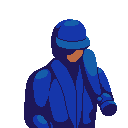
Yeah I think I found the problem. I was using photoshop to make the sprite transparent but it ended up deleting a few pixels around the outlines.
![[Image: eoSwXpr.png]](http://imgur.com/eoSwXpr.png)
Fixed. I
think
Posts: 524
Threads: 9
Joined: Jul 2012
12-16-2014, 07:27 PM
(This post was last modified: 12-16-2014, 07:29 PM by TheShyGuy.)
You got a lot of banding going on. Also, none of the shades on the jacket or face are noticeable - up the constrast.
Your avatar pic looks like it's "dirty" or "noisy", btw.
Posts: 1,591
Threads: 64
Joined: Oct 2010
i think its because he said the avatar as a jpeg, perhaps?
Posts: 1,664
Threads: 50
Joined: Nov 2011
No, tVGR automatically jpegs some avatars for some reason. It can be solved by having transparency in there, since then it has to be a PNG
Posts: 1,678
Threads: 58
Joined: Mar 2012
I opened the image manually and it came out clean. (right click > open image)
Posts: 1,678
Threads: 58
Joined: Mar 2012
12-23-2014, 12:45 PM
(This post was last modified: 12-27-2014, 08:27 AM by ~Axis~.)
K. I think I finished with the shading problem on the jacket.
![[Image: go3CyUu.png]](http://imgur.com/go3CyUu.png)
Update:
![[Image: 71968C5.png]](http://imgur.com/71968C5.png)
I tweaked the colors a bit to suit my liking using the tfr pallete as a base.
![[Image: 7MG3HOa.png]](http://imgur.com/7MG3HOa.png)
ooh and I made this little cute squirrel thing. It's called a Quizzle.








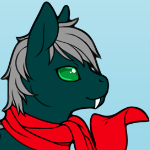
![[Image: sgJRAi2.png]](http://imgur.com/sgJRAi2.png)
![[Image: QuberdI.png]](http://imgur.com/QuberdI.png)
![[Image: 2jOFFnU.png]](http://imgur.com/2jOFFnU.png)