




05-26-2014, 11:57 AM
(This post was last modified: 05-19-2017, 12:29 PM by NICKtendo DS.)
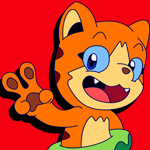
Neko "Bouncy" Cat:
A character with short range attacks, which he makes up for in speed and fast execution.
-His two dash attacks help him zip across the screen. The tackle is fast, but travels a short distance, while the duration of his roll is longer and covers more distance. The animation of the roll loops 2 times if the attack key is tapped and 3 times if it's held.
-His back punch also causes Neko to dash forward.
-His Golden Neko attack is similar to Blanka's electric attack.
-His Angry Boxing Glove Upper is similar to Ryu's Shoryuken. (Neko moves diagonal up)
-The moon in Neko's Gognio Special deals damage from when it appears above screen above Neko to when it is off-screen after it's thrown.
-His jump punch functions as a small mid-air jump, but only once per regular jump.
[spoiler="Voice/SFX dump"]
Bounce
Pop
Neko: Nya
Neko: Nyaaaah!! (hurt)
Neko: Purr
Meek (Because I don't know)
Explosion
Electric/Steel Hit
Shot (Nya Ken)
New folder (Super Bouncy Cat sounds)
[/spoiler]
Pre battle dialogue: "Nya!"
Victory dialogue: "*purrr*"
Defeat dialogue: "Nyaack!!"
[spoiler=Animated GIF dump]![[Image: 6Wv8ggr.png]](http://i.imgur.com/6Wv8ggr.png)
![[Image: z1zhbXt.gif]](http://i.imgur.com/z1zhbXt.gif)
![[Image: n36M6e9.gif]](http://i.imgur.com/n36M6e9.gif)
![[Image: p5oGZVL.gif]](http://i.imgur.com/p5oGZVL.gif)
![[Image: LCdLgNV.gif]](http://i.imgur.com/LCdLgNV.gif)
![[Image: qVNQofh.gif]](http://i.imgur.com/qVNQofh.gif)
![[Image: pUx7Y4e.gif]](http://i.imgur.com/pUx7Y4e.gif)
![[Image: nJTimGB.gif]](http://i.imgur.com/nJTimGB.gif)
![[Image: SfdYg2d.gif]](http://i.imgur.com/SfdYg2d.gif)
![[Image: sZRpc3O.gif]](http://i.imgur.com/sZRpc3O.gif)
![[Image: 5NJj474.gif]](http://i.imgur.com/5NJj474.gif)
![[Image: J0qCMSz.gif]](http://i.imgur.com/J0qCMSz.gif)
![[Image: w7uzaAA.gif]](http://i.imgur.com/w7uzaAA.gif)
![[Image: 9GIPl3K.gif]](http://i.imgur.com/9GIPl3K.gif)
![[Image: xO8n5vb.gif]](http://i.imgur.com/xO8n5vb.gif)
![[Image: RN3i5Pa.gif]](http://i.imgur.com/RN3i5Pa.gif)
![[Image: rmdeLkI.gif]](http://i.imgur.com/rmdeLkI.gif)
![[Image: 3vmGzfU.gif]](http://i.imgur.com/3vmGzfU.gif)
![[Image: 89qGWPR.gif]](http://i.imgur.com/89qGWPR.gif)
![[Image: 1Kk00bs.gif]](http://i.imgur.com/1Kk00bs.gif)
![[Image: ED41Sv4.gif]](http://i.imgur.com/ED41Sv4.gif)
![[Image: KChSuoc.gif]](http://i.imgur.com/KChSuoc.gif)
![[Image: 2M6MHxx.gif]](http://i.imgur.com/2M6MHxx.gif)
![[Image: 9lGKK1Y.gif]](http://i.imgur.com/9lGKK1Y.gif)
![[Image: As4QZo7.gif]](http://i.imgur.com/As4QZo7.gif)
![[Image: hPydJ1r.gif]](http://i.imgur.com/hPydJ1r.gif)
![[Image: U7Xm0D1.gif]](http://i.imgur.com/U7Xm0D1.gif)
![[Image: MN9HhkM.gif]](http://i.imgur.com/MN9HhkM.gif)
![[Image: ZNKnyxh.gif]](http://i.imgur.com/ZNKnyxh.gif)
![[Image: IU7zfEN.gif]](http://i.imgur.com/IU7zfEN.gif)
![[Image: M7gSEGX.gif]](http://i.imgur.com/M7gSEGX.gif)
![[Image: 1Ik15P4.gif]](http://i.imgur.com/1Ik15P4.gif) [/spoiler]
[/spoiler]
![[Image: qeU2hZB.png]](http://i.imgur.com/qeU2hZB.png)
Frames not to be affected by palette changes:
Princess (Win), Golden Neko, Goldstar Neko, Nyaken, Dianyaken, Radish, Frozen (Status), Strawberry (because leaves and tube share colors), Dragon Ball (Moe), Lionheart (Beast) (Intro B )
![[Image: 6fzOwGg.png]](http://i.imgur.com/6fzOwGg.png)
![[Image: iYfVvPM.png]](http://i.imgur.com/iYfVvPM.png)
![[Image: P5fqGkB.jpg]](http://i.imgur.com/P5fqGkB.jpg)
A character with short range attacks, which he makes up for in speed and fast execution.
-His two dash attacks help him zip across the screen. The tackle is fast, but travels a short distance, while the duration of his roll is longer and covers more distance. The animation of the roll loops 2 times if the attack key is tapped and 3 times if it's held.
-His back punch also causes Neko to dash forward.
-His Golden Neko attack is similar to Blanka's electric attack.
-His Angry Boxing Glove Upper is similar to Ryu's Shoryuken. (Neko moves diagonal up)
-The moon in Neko's Gognio Special deals damage from when it appears above screen above Neko to when it is off-screen after it's thrown.
-His jump punch functions as a small mid-air jump, but only once per regular jump.
[spoiler="Voice/SFX dump"]
Bounce
Pop
Neko: Nya
Neko: Nyaaaah!! (hurt)
Neko: Purr
Meek (Because I don't know)
Explosion
Electric/Steel Hit
Shot (Nya Ken)
New folder (Super Bouncy Cat sounds)
[/spoiler]
Pre battle dialogue: "Nya!"
Victory dialogue: "*purrr*"
Defeat dialogue: "Nyaack!!"
[spoiler=Animated GIF dump]
[/spoiler]Frames not to be affected by palette changes:
Princess (Win), Golden Neko, Goldstar Neko, Nyaken, Dianyaken, Radish, Frozen (Status), Strawberry (because leaves and tube share colors), Dragon Ball (Moe), Lionheart (Beast) (Intro B )
![[Image: Llnx8ad.png]](http://i.imgur.com/Llnx8ad.png)
![[Image: BZZlGhM.png]](http://i.imgur.com/BZZlGhM.png)


![[Image: 503HyA5.png]](http://i.imgur.com/503HyA5.png)

![[Image: bD31Zoa.png]](http://i.imgur.com/bD31Zoa.png)
![[Image: 1H5prLv.png]](http://i.imgur.com/1H5prLv.png)
 I wouldn't hatch anything small like his claw, though.

![[Image: 9vhXWeb.png]](http://i.imgur.com/9vhXWeb.png)
![[Image: taV6lLN.png]](http://i.imgur.com/taV6lLN.png)
