


01-29-2009, 09:07 AM
It's the sword man, it's blurry as hell and is upping the number of colors. I assume you rotated the sword yourself, so you have Fireworks on bilinear or bicubic instead of Nearest Neighbor.
| Important Announcement |
| Forum has been made read-only. Please click here for more information or here to return to The Spriters Resource. |

 Ripping Questions
|
Ripping Questions
|

01-29-2009, 09:07 AM
It's the sword man, it's blurry as hell and is upping the number of colors. I assume you rotated the sword yourself, so you have Fireworks on bilinear or bicubic instead of Nearest Neighbor.

01-29-2009, 09:11 AM
Even without the sword...
![[Image: avatarts0.gif]](http://img142.imageshack.us/img142/6302/avatarts0.gif) 4 frames and still pretty big... 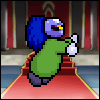
01-29-2009, 09:36 AM
Is there anyway to remove layers from Snes9x?
If not, then should I use another emulator? 
01-29-2009, 09:42 AM
Layers can be disabled in Snes9x by pressing 1-5 on your keyboard (5 is the sprites layer). I don't know if you can change the background from black though, which will cause problems if your sprite has black in it (likely).
01-29-2009, 09:48 AM
DarkZero: Buttons 1 through 5 should remove layers on SNES9x.
Dymlos: Try removing the backgrounds before you save the gif. I tried it with Imageready and the latest gif you posted I removed the background only and it's at 3KB. But since I'm not familiar with Fireworks, is there a Save Optimized in the File Menu? 
01-29-2009, 01:00 PM
01-29-2009, 02:43 PM
(01-29-2009, 09:48 AM)deathbringer Wrote: DarkZero: Buttons 1 through 5 should remove layers on SNES9x. Can't believe CS3 doesn't have imageready... I usually have no background but I guess fireworks doesn't have a save optimized
01-29-2009, 07:23 PM
It could be because of Fireworks itself. I don't actually know anything about the program and its saving methods :[
01-29-2009, 07:26 PM
01-30-2009, 07:31 AM
With roms its apparently only legal if u own the game
 
02-02-2009, 12:09 PM
Does any one use PhotoShopCS4
How do I change my grids? The only grid settings I can find are in percent and pixels etc.. I can not find an option that lets me add a set number of lines vertically and horizontally. 
02-06-2009, 08:00 AM
Does anybody know how to use codes/ation replay for Desmume-0.9?

02-10-2009, 04:08 PM
(02-02-2009, 12:09 PM)NappyXD Wrote: Does any one use PhotoShopCS4 Dunno about CS4, but in CS3 (I presume it works the same way) you go to Edit> Preferences> Guides, Grid, and Slices. There you can set the color, style and grid size. hth 
02-13-2009, 08:56 AM
Sorry,if that is the wrong place,but can someone help me out?
I need to recolour some of the sprites from KSSU: I need to get some sprites from normal enemy waddle dees into the color scheme from the normal,playable Waddle Dee. (I just need some idling sprites ,where the playable one doesn´t rise his hand,because he has an parasol there) Well...now my idea is: When I rip sprites,the sprites have got an own color pallet,but I just need to change a complete sprite sheet into an other pallet. How do I do that in Paint.NET? (fuck,I can´t explain anything in EnglishXD) |
|
« Next Oldest | Next Newest »
|
![[Image: stahnavatartg9.gif]](http://img99.imageshack.us/img99/4752/stahnavatartg9.gif)

