Wikipedia Wrote:The original Game Boy uses a monochrome 4-shades palette. Due to the fact that the non-backlighted LCD display background is greenish, this results in a green-scale graphic display, as it is shown in the simulated image (at Game Boy display resolution), below.
![[Image: Screen_color_test_Gameboy.png]](https://upload.wikimedia.org/wikipedia/commons/f/f7/Screen_color_test_Gameboy.png)
As EpicEbilninja said, most sprites would be restricted to 3 since the fourth is needed for transparency, like the
Pokemon R/B overworld sprites. However, if you look closely you'll notice that
the trainer sprites actually have 4. I'm not sure (I haven't looked into this stuff), but I would assume that they can do this by utilising the background colour. They can use the fourth colour, which is still treated as transparent by the engine, but because there's nothing behind them, you see it as an extra colour.
[SPOILER=I may have explained that horribly so let me illustrate]
Consider this screenshot:

You'll notice that both Blue and Red look like they're made up of 4 colours. Actually, they're only using 3: the fourth one, white, is simply the background colour; the white pixels in the sprites are actually transparent. If I change the background:
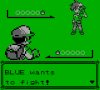
You'll see what I mean. The sprites look like they're using a fourth colour, but that's just clever use of transparency. White
is actually the fourth colour in the sprite's palette, but the engine processes it as transparent, and the background just fills it in.
This only works for sprites that are viewed in front of a solid background though. If there are sprites behind them, it'll look weird, like if I were to put Blue behind Red:

That's why the overworld sprites can only use 3 colours, the fourth one needs to be used as actual transparency (so that they can be in front of other stuff).
[/SPOILER]
That's how I think it works, anyway. Hope that makes sense!





![[Image: 10gmuqf.png]](http://i58.tinypic.com/10gmuqf.png)
 .
.



 . I dunno when I'll be able to check back in, but don't worry, I won't forget about this project
  .
.