





12-21-2022, 11:54 AM
(This post was last modified: 04-09-2024, 11:24 AM by Jasper7438.)
Depends on your file type.
For OBJ - Delete everything before the folder the texture is in.
map_Kd C:\\Users\\Owner\\Desktop\\Models\\Textures\\body.png
map_Kd Textures\\body.png
For DAE - Replace everything before the folder the texture is in with "." [period], If the texture is in the same folder as the model then delete everything other than the texture name.
<init_from>C:\Users\Owner\Desktop\Models\body.png</init_from>
<init_from>.\Models\body.png</init_from>
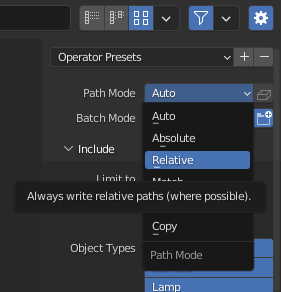
For FBX - Check your program's texture path settings before exporting.
For OBJ - Delete everything before the folder the texture is in.
map_Kd C:\\Users\\Owner\\Desktop\\Models\\Textures\\body.png
map_Kd Textures\\body.png
For DAE - Replace everything before the folder the texture is in with "." [period], If the texture is in the same folder as the model then delete everything other than the texture name.
<init_from>C:\Users\Owner\Desktop\Models\body.png</init_from>
<init_from>.\Models\body.png</init_from>
For FBX - Check your program's texture path settings before exporting.